Hello EB,
Most of time we get some problems with Sun solaris machines at boot time, generally it because of bad sectors or damaged file system. Machine go into File system repair option, so deal with these kind of problems use following commands -
fsck -F (ufs/vxfs) /dev/rdsk/(partition)
noninteractive :fsck tries to repair all the problems it finds in a file system without stopping for user response useful in case of a large number of inconsistencies in a file system but has the disadvantage of removing some useful files which are detected to be corrupt .
If file system is found to have problem at the booting time non interactive fsck fsck is run and all errors which are considered safe to correct are corrected. But if still file system has problems the system boots in single user mode asking for user to manually run the fsck to correct the problems in file system
fsck -F (ufs/vxfs) -Y /dev/rdsk/(partition)
Please use this option at your own risk because it will consider "yes" option for every qwestion so your filesystem might get modified.
Some fsck options as follows -
fsck [ -F fstype] [-V] [-yY] [-o options] special
-F fstype type of file system to be repaired ( ufs , vxfs etc)
-V verify the command line syntax but do not run the command
-y or -Y Run the command in non interactive mode - repair all errors encountered without waiting for user response.
-o options Three options can be specified with -o flag
b=n where n is the number of next super block if primary super block is corrupted in a file system .
p option used to make safe repair options during the booting process.
f force the file system check regardless of its clean flag.
special - Block or character device name of the file system to be checked/repaired - for example /dev/rdsk/c0t3d0s4 .Character device should be used for consistencies check & repair
phases:
fsck checks the file system in a series of 5 pages and checks a specific functionality of file system in each phase.
** phase 1 - Check Blocks and Sizes
** phase 2 - Check Pathnames
** phase 3 - Check Connectivity
** phase 4 - Check Reference Counts
** phase 5 - Check Cylinder Groups
Wednesday, October 04, 2006


Wednesday, September 06, 2006
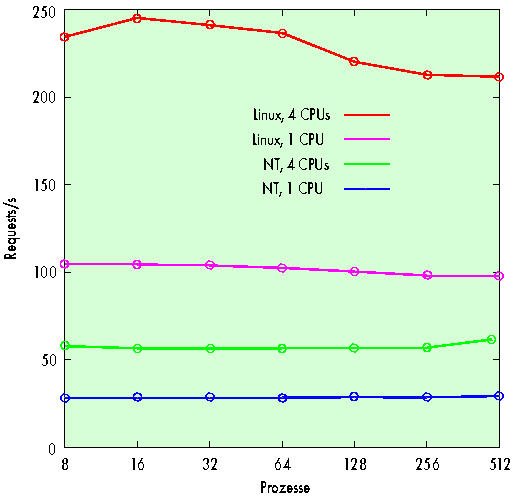
Benchmark chart of Linux v/s Windows
Hello EB,
I have both Linux and windows while running webserver. In this senario, the overall size of one million files was about twice as large as the 2 GB of main memory. The total number of requests in test runs for which a reboot had previously cleared the buffer cache was clearly below 500,000. Files would generally have to be loaded from hard disk before being sent through the net.
In this setup, the freeware system clearly shows better results: While NT can hardly manage more than 30 requests per second, Linux can handle more than 166. With 512 client processes, it even manages 274 pages per second. Since more than 400,000 pages are retrieved during this test, however, we cannot be entirely sure that the increase especially towards the end of the graph isn't down to a caching effect. But who would complain about an overly efficient buffer cache?
When calling CGI scripts, Windows NT is no match for Linux. As the load is not confined to kernel mode in this case, Linux can benefit from additional CPUs. The graph at the bottom nicely depicts the linear increase for a CGI script with integrated delay.
Wednesday, August 30, 2006
Remote installation of RHES4 64bit
Remote installation of RHES4.2 64bit -
If that server is already having redhat version installed –
1. Copy kernel and initrd image in /boot directory (In my senario I already made RHES4u2.tar.gz gz file using /remoteinstall/Redhat4update2/images/pxeboot/* on my file server , you can use 1st CD of RHES4update2 top copy the kernel and initrd image)
172.30.0.62 - This is my file server
scp username@173.30.0.62:/remoteinstall/Redhat/RHES4u2.tar.gz
tar -xvzf RHES4.u2.tar.gz
cp pxeboot/* /boot/
2. Edit the /etc/grub.conf file. Go onto next line of splash image.
title rhes4
root (hd0,0)
kernel /vmlinuz vnc vncconnect=172.30.0.3 headless ip=172.30.0.127 netmask=255.255.255.0 gateway=172.30.0.1 dns=172.30.0.41 ks=http://172.30.0.131/ks4.cfg
initrd /initrd.img
Save the file and reboot the machine.
3. Now start you vncviewer into listen mode.
(Make following changes
1.Replace 172.30.0.3 ip with your desktop’s ip
2. Replace 172.30.0.127 with to the IP of the machine which you are installing.)
My kick start configuration file looks like this -
# Kickstart file automatically generated by anaconda.
install
nfs --server=172.30.0.62 --dir=/big2/Redhat/RHES4.u2_64
lang en_US.UTF-8
langsupport --default=en_US.UTF-8 en_US.UTF-8
keyboard us
rootpw --iscrypted $1$1zTBqKn5$lnZ052YwM6uILBON/khw0.
firewall --disabled
selinux --enforcing
authconfig --enableshadow --enablemd5
timezone --utc Asia/Calcutta
bootloader --location=mbr --append="rhgb quiet"
# The following is the partition information you requested
# Note that any partitions you deleted are not expressed
# here so unless you clear all partitions first, this is
# not guaranteed to work
clearpart --all
part /boot --fstype ext3 --size=100
part /usr --fstype ext3 --size=15000
part / --fstype ext3 --size=5000
part /opt --fstype ext3 --size=2000
part /var --fstype ext3 --size=2000
part /tmp --fstype ext3 --size=2000
part swap --size=2000
%packages
@ compat-arch-development
@ admin-tools
@ system-tools
@ dialup
@ compat-arch-support
@ legacy-software-development
@ base-x
@ development-tools
e2fsprogs
kernel-devel
kernel
%post
Hope this will help somebody :)
If that server is already having redhat version installed –
1. Copy kernel and initrd image in /boot directory (In my senario I already made RHES4u2.tar.gz gz file using /remoteinstall/Redhat4update2/images/pxeboot/* on my file server , you can use 1st CD of RHES4update2 top copy the kernel and initrd image)
172.30.0.62 - This is my file server
scp username@173.30.0.62:/remoteinstall/Redhat/RHES4u2.tar.gz
tar -xvzf RHES4.u2.tar.gz
cp pxeboot/* /boot/
2. Edit the /etc/grub.conf file. Go onto next line of splash image.
title rhes4
root (hd0,0)
kernel /vmlinuz vnc vncconnect=172.30.0.3 headless ip=172.30.0.127 netmask=255.255.255.0 gateway=172.30.0.1 dns=172.30.0.41 ks=http://172.30.0.131/ks4.cfg
initrd /initrd.img
Save the file and reboot the machine.
3. Now start you vncviewer into listen mode.
(Make following changes
1.Replace 172.30.0.3 ip with your desktop’s ip
2. Replace 172.30.0.127 with to the IP of the machine which you are installing.)
My kick start configuration file looks like this -
# Kickstart file automatically generated by anaconda.
install
nfs --server=172.30.0.62 --dir=/big2/Redhat/RHES4.u2_64
lang en_US.UTF-8
langsupport --default=en_US.UTF-8 en_US.UTF-8
keyboard us
rootpw --iscrypted $1$1zTBqKn5$lnZ052YwM6uILBON/khw0.
firewall --disabled
selinux --enforcing
authconfig --enableshadow --enablemd5
timezone --utc Asia/Calcutta
bootloader --location=mbr --append="rhgb quiet"
# The following is the partition information you requested
# Note that any partitions you deleted are not expressed
# here so unless you clear all partitions first, this is
# not guaranteed to work
clearpart --all
part /boot --fstype ext3 --size=100
part /usr --fstype ext3 --size=15000
part / --fstype ext3 --size=5000
part /opt --fstype ext3 --size=2000
part /var --fstype ext3 --size=2000
part /tmp --fstype ext3 --size=2000
part swap --size=2000
%packages
@ compat-arch-development
@ admin-tools
@ system-tools
@ dialup
@ compat-arch-support
@ legacy-software-development
@ base-x
@ development-tools
e2fsprogs
kernel-devel
kernel
%post
Hope this will help somebody :)
Thursday, August 24, 2006
rpm options
Hello EB,
rpm is a powerful Package Manager, which can be used to build, install, query, verify, update, and erase individual software packages. A package consists of an archive of files and meta-data used to install and erase the archive files. The meta-data includes helper scripts, file attributes, and descriptive information about the package. Packages come in two varieties: binary packages, used to encapsulate software to be installed, and source packages, containing the source code and recipe necessary to produce binary packages.
Now most of famous distribution used rpm packages like redhat, suse and even lot free distributions like white box.
Following are some but basic option for rpm command -
rpm {-i--install} [install-options] PACKAGE_FILE ...
rpm {-U--upgrade} [install-options] PACKAGE_FILE ...
#rpm -qf /usr/lib/libstdc++-2-libc6.1-1-2.9.0.so
compat-libstdc++-7.3-2.96.128
#rpm -ql compat-libstdc++-296-2.96-132.7.2
/usr/lib/libstdc++-2-libc6.1-1-2.9.0.so
/usr/lib/libstdc++-3-libc6.2-2-2.10.0.so
/usr/lib/libstdc++-libc6.2-2.so.3
rpm is a powerful Package Manager, which can be used to build, install, query, verify, update, and erase individual software packages. A package consists of an archive of files and meta-data used to install and erase the archive files. The meta-data includes helper scripts, file attributes, and descriptive information about the package. Packages come in two varieties: binary packages, used to encapsulate software to be installed, and source packages, containing the source code and recipe necessary to produce binary packages.
Now most of famous distribution used rpm packages like redhat, suse and even lot free distributions like white box.
Following are some but basic option for rpm command -
rpm {-i--install} [install-options] PACKAGE_FILE ...
rpm {-U--upgrade} [install-options] PACKAGE_FILE ...
- Sometimes you want to know which library uses which rpm packages or vice versa one rpm packages installs which libraries
#rpm -qf /usr/lib/libstdc++-2-libc6.1-1-2.9.0.so
compat-libstdc++-7.3-2.96.128
#rpm -ql compat-libstdc++-296-2.96-132.7.2
/usr/lib/libstdc++-2-libc6.1-1-2.9.0.so
/usr/lib/libstdc++-3-libc6.2-2-2.10.0.so
/usr/lib/libstdc++-libc6.2-2.so.3
- Most of time you want to uninstall some rpm packages and you use rpm -e but it says there multiple packages are exist use
rpm -e --allmatches {rpm name}
Let me know if you have any queries with rpm commands,
hope these information will help you.
Thanks
Tuesday, July 18, 2006
Free E-Books To Download
Hello Guys,
Check out this kool link for free e-books to download till 4th August 2006.
So hurry...
http://worldebookfair.com/Technical_eBook_Colleciton.htm
Cheers,
Check out this kool link for free e-books to download till 4th August 2006.
So hurry...
http://worldebookfair.com/Technical_eBook_Colleciton.htm
Cheers,
Thursday, July 06, 2006
Desktop Linux Edition from Xandros
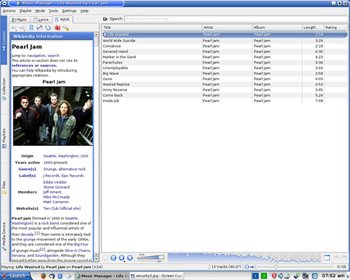
Xandros Desktop Home Edition - Premium is a complete Linux desktop operating system that also includes the applications needed to work, communicate and play. Built on the stable and reliable Debian Linux platform, Xandros Desktop allows you to enjoy your digital lifestyle, the way you want to, without the hassles of viruses, spyware and other security threats. Xandros is fun and easy to use. It installs in just 4 clicks, and does not require any Linux or technical know-how. Discover how easily you will enjoy the benefits of Linux and bring security and stability you can count on to your PC with Xandros Desktop.
Music · Photos · Video · Web · E-mail · Multimedia
The new home for your digital life is ready. From web surfing to auction bidding, photo taking to album making, video streaming to iPod syncing and e-mailing to online banking… Wherever your digital life may take you, Xandros Desktop is the secure and exciting gateway to your digital world.
For more information - www.xandros.com
Redhat Made It Easy

Redhat made it easy.
You know Linux is reliable. You know it has security you can trust. In fact, nearly half of medium-sized businesses rate moving to Linux as either important or very important.* With the right experience and expertise, you can make the move, too.
The reputation of Linux in enterprise environments is rock solid. For its performance it has attracted some of the largest financial institutions. For its security it has been adopted by governments around the globe.
We believe small and mid-sized companies should have every advantage that the largest companies have with their technology: Performance, reliability, affordability, room to grow. Without compromise.
Redhat made it easy.
Keybank
Dave Seager
VP Manager of UNIX systems
Keybank is the 16th largest financial institution in the US with approximately 2000 branches and 22,000 employees. They needed to consolidate existing platforms and build bridges between existing systems. They looked at all the other Linux companies but quickly realized that Red Hat is the market leader and that there was no comparison. They also realized that running Red Hat Enterprise Linux 4 on Intel-based platforms gave them the best overall solution providing the highest performance, best cost savings, and the most choice.
Subscribe to:
Posts (Atom)